(This help page describes the latest version of Word Search Printer - 4.00)
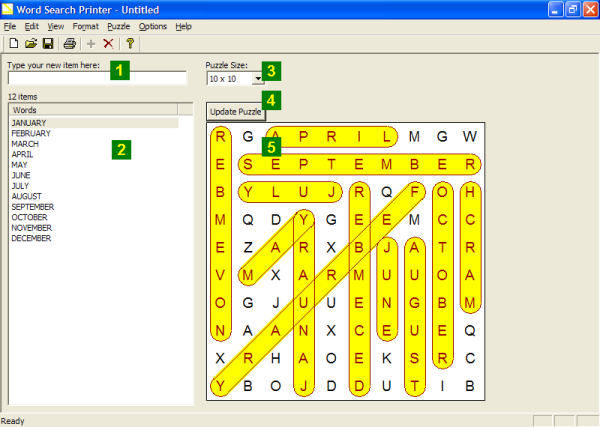
Editing Here is what the main screen of Word Search Printer will look like after
you have created a New project
(note: the green numbers are not
actually part of the screen, but are used to here indicates various features
on the screenshot).
The screen allows you to review and edit items in the word list
(the words or phrases that will be placed on the puzzles), as well as
preview the puzzle or solution, and change the size of the puzzle.
The features on screen are:
If you want add an item, enter it here, then press
the Enter or Return key on the keyboard.
If you want to add many items quickly, (for example by pasting items from
another program), you can use the Add Multiple Items... option on the
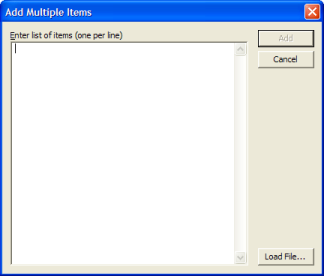
Edit menu. This displays this dialog box:
Enter items, one per line, in the field provided.
If you wish to paste text from another program, while the caret is
in the entry space, press Ctrl+V. You can use this
feature to paste from a
word processor
or
spreadsheet.
In fact, this feature works particularly well with
spreadsheets
such as Excel or
OpenOffice.org's Calc,
as you can simply highlight and Copy a column of items in the spreadsheet,
and then paste it here.
You can also read a text file in using the Load File... button.
Click Cancel if you wish to close the dialog without adding
any of the items that you have entered.
Click Add to add the items from the dialog box.
If some of the items that you have entered
can not be added (for example: if they contain too many characters or are duplicates),
you will be told alerted to that fact, but given
the option to add the remaining items.
This area shows a list of items
that you have added so far, as well as a count of the number of items.
You
can use the scrollbar to move through the items if there are more than
will fit on the screen.
If you wish to copy the current list of items to the Clipboard
(for example to paste into another program such as a
word processor
or
spreadsheet),
select the Edit dropdown menu, then select the Copy submenu,
and then select Word List.
You can delete an item by selecting it,
and then using the Delete Item
option on the Edit menu.
You can delete all the items using Delete All Items... on the Edit
menu.
You can sort the items into order using Sort on the Edit
menu. The items will then be sorted alphabetically.
The Card Size
option allows you to choose the size of word search puzzle that you wish to generate.
Sizes range from a minimum of 5 x 5 up to a maximum of
40 x 40.
The Update Puzzle option
will generate a new word search puzzle based on the current word list. If you edit
the word list (or change the size, shape or word directions) then the puzzle will be updated automatically -
you do not need to manually update this puzzle. The Update Puzzle
option is there in case you either don't like the current puzzle, or simply want to
generate a new one.
Selecting Update Puzzle on the Puzzle menu (or pressing the F5
key) has the same effect as clicking this button.
This area shows a preview of the
current puzzle or solution.
Please note:
In the event that the word list contains no items, the preview will not be shown.
If the puzzle is not large enough to accommodate all the words in the word list,
or other similar problems, a message explaining the situation and what you should
do to correct the problem will be displayed in this area instead of a preview.
You can choose which one that you want to view using
options on the View menu:
Click the View dropdown, select Preview and then
Puzzle if you wish to preview the current puzzle.
Click the View dropdown, select Preview and then
Solution if you wish to preview the solution for current puzzle.
Disclosure:
Our company's websites' content (including this website's content) includes advertisements for
our own company's websites, products, and services,
and for other organization's websites, products, and services.
In the case of links to other organization's websites,
our company may receive a payment, (1) if you purchase products or services,
or (2) if you sign-up for third party offers, after following links from this website.
Unless specifically otherwise stated, information about other organization's products and services,
is based on information provided by that organization,
the product/service vendor, and/or publicly available information - and should
not be taken to mean that we have used the product/service in question.
Additionally, our company's websites contain some adverts which we are paid
to display, but whose content is not selected by us, such as Google AdSense ads. For more
detailed information, please see Advertising/Endorsements Disclosures
Our sites use cookies, some of which may already be set on your computer. Use of our site
constitutes consent for this. For details, please see Privacy.
Click privacy for information about our company's privacy, data collection and data retention policies, and your rights.
"Box" and "Cover" images are shown for decorative purposes only, and do not
represent the actual products which are delivered as Internet downloads.
"Box" and "Cover" images on this site were created using
CoverFactory.
Register Now/Buy Now! buttons used on this website,
are from the CB Vendor Graphics Pack.
CERTAIN CONTENT THAT APPEARS ON THIS SITE COMES FROM AMAZON SERVICES LLC. THIS CONTENT IS PROVIDED 'AS IS' AND IS SUBJECT TO CHANGE OR REMOVAL AT ANY TIME. CERTAIN CONTENT THAT APPEARS ON THIS SITE,COMES FROM AMAZON EU S.à r.l. THIS CONTENT IS PROVIDED 'AS IS' AND IS SUBJECT TO CHANGE OR REMOVAL AT ANY TIME.
In Association With Amazon.com Answers 2000 Limited is a participant in the Amazon Services LLC Associates Program, an affiliate advertising program designed to provide a means for sites to earn advertising fees by advertising and linking to Amazon.com. In Association With Amazon.co.uk Answers 2000 Limited is a participant in the Amazon EU Associates Programme, an affiliate advertising programme designed to provide a means for sites to earn advertising fees by advertising and linking to Amazon.co.uk. As an Amazon Associate, our company earns from qualifying purchases. Amazon, the Amazon logo, Endless, and the Endless logo are trademarks of Amazon.com, Inc. or its affiliates.